Editing of existing questions is simple. Click on the questions in the survey admin screen. This screen will give you an overview of all questions:
 |
Sections
Sections can be used to create a group of related questions and defining the page layout, including page breaks and rotation of questions.
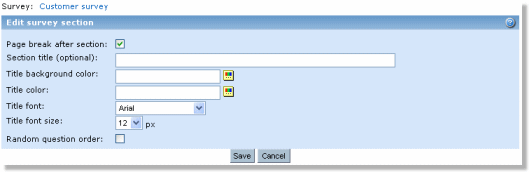 |
Originally, all questions are placed on one default survey page. Use "New section" link to add a new section. You can specify section title and its look/feel for each section. Switch the Page break attribute on if you want to separate this section to be the last section on the page. This attribute makes it possible to place more than one logical question group (section) on a visible survey page.
You can also select to present the questions in a random order. By selecting this option all the questions within the section will appear in a random order the first time the respondent is viewing them. In other words the questions will not rotate while the respondent is moving back and forth.
Questions cannot exist outside sections. When creating a new section, it will start from the question which the "New section" link was clicked and include all questions down to the next section or the end of the survey. Survey introduction can be separated from the questions by clicking on the "New section" link above the first question.
Note: Make sure you check the sections setup before you publish your survey, because the question layout may not always be as you intended. For example, if you have inserted questions in the middle of your survey.
Text
Text can be inserted anywhere in the survey; between questions, before and after section headings etc. and they can be edited and deleted. When deleting questions or sections, adjacent texts are concatenated, because there can only be one text between two questions, or between a question and a section heading. Text items stay in the same position when a question is moved. If a question is moved to a different section, the text before and after is concatenated. Texts cannot be moved around in the survey (must be deleted and inserted elsewhere).