Importing question libraries is useful when moving libraries from one installation to another.
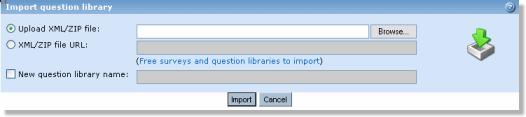
To import a question library click the “import question library” link. In the next window, select either to browse your system for the xml file (or a zip file containing the xml file) or type in the URL to where it is located.
 |
example of xml file link:
http://www.yourserver.com/common_questions.xml
IMPORTANT: The file must be a valid XML file. The only way to ensure that the XML code is valid, is to produce the xml file by the Opinio export function.
If you would like to give the imported question library a new name, click on the checkbox and enter the new question library name. Please note that this option is optional, and if not selected the question library name from the xml file will be used.
When the “Import” button is clicked, the file will be uploaded to the server. As soon as the file has been uploaded to the server, Opinio will read and store the elements in the XML file.