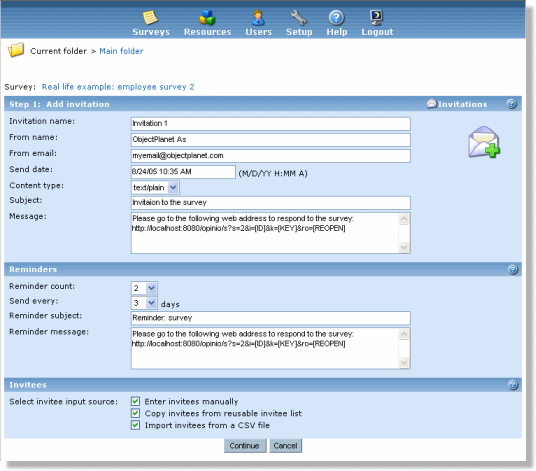
- Invitation name: The system label for the invitation. It will not show on the invitations you send out, but used as an identifier when looking at the list of invitations you have created for your survey.
- From name: Enter your name or company here. This will show in the from-field of the email sent.
- From email: Enter your email or company email address here. This will show in the invitation email.
- Send date: Set the date and time you want the invitations to be sent.
- Content type: If you want to include HTML code in your invitation email, you have to set this parameter to "text/html". To include html code simply type/paste the code in the "message" field. If you do not need to use HTML in the invitation, select "text/plain".
- Subject: The subject in the email sent to invitees. A descriptive, but short subject is recommended.
- Message: The content of the email sent to invitees. It is also possible to type in html code if you want the mail to be shown as a web page. E.g. use graphics, colors, etc. Make sure you include the link to the survey here. You can use variables [NAME] and [EMAIL] to add invitee name and email to the invitation message.
NOTE: Do not change the link to the survey. The survey might be unreachable if it is changed. The [ID] and [KEY] is used to track the invitees, to indicate who has responded, and who has not. [REOPEN] is only used when an invitee already has completed the survey and the link has been resent from the Opinio admin module. This is another key generated from the respondent id and invitee key. When this reopen key is valid the multiple restrictions (if any) will be reset, and the invitee will be able to continue with the reopened survey. It is not used instead of, but in addition to the invitee key.