Use invitations when you know the identity of the people you want to respond to your survey. Click on "invitations", then "add".
Important: Remember to set up your email server first. See setup
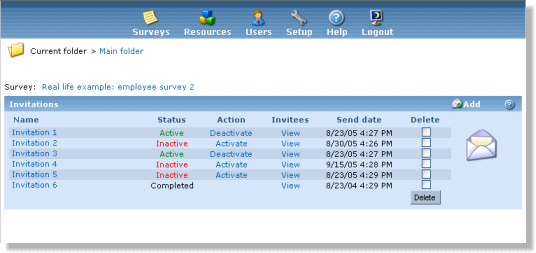
From the invitation list screen you can see status for all invitations and the send date. You can also change invitation status, view invitees and delete invitations. Invitation can have one of the following statuses:
- Active. Invitation is active when it is scheduled for sending emails. This means that on send date (or after if activated past the send date), emails are send to all registered invitees.
- Inactive. Invitation is inactive when it is not scheduled. All new invitations get inactive status and must be activated to send emails. No emails will be sent on the send date if the invitation is inactive at that time.
Sending. Invitation has Sending status if it is actually sending emails at the time you are watching the invitation status.
IMPORTANT: If you deactivate invitation now, it will immediately stop sending emails. However, current execution will still be counted as finished. Thus, if you deactivate invitation which supposes to send email to 1000 invitees while it's running, invitation status will be set to Completed even if it has only sent emails to 100 invitees.
- Completed. Invitation gets Completed status when invitaion email and all reminders are sent. If an invitation is completed and there are still invitees who have not responded, you can send an additional reminder to these invitees by clicking on the "Send reminder" link.
- Error. This status is assigned if an error occurs in the invitation.
You can change invitation status from this screen. Note that you can't activate invitation if invitee import is in progress.